There are two ways to receive funds through WeChat Pay in China. Foreign nationals can also receive funds once they have completed the WeChat Pay receiving setup.
1. How to receive with Weixin Wallet
*There is no need to link a bank account, you can receive funds more conveniently.
2. How to receive money from a bank account linked to Weixin
*After verifying your phone number, you must add a [bank card] to receive it normally.
◈ Please set up your receiving method.
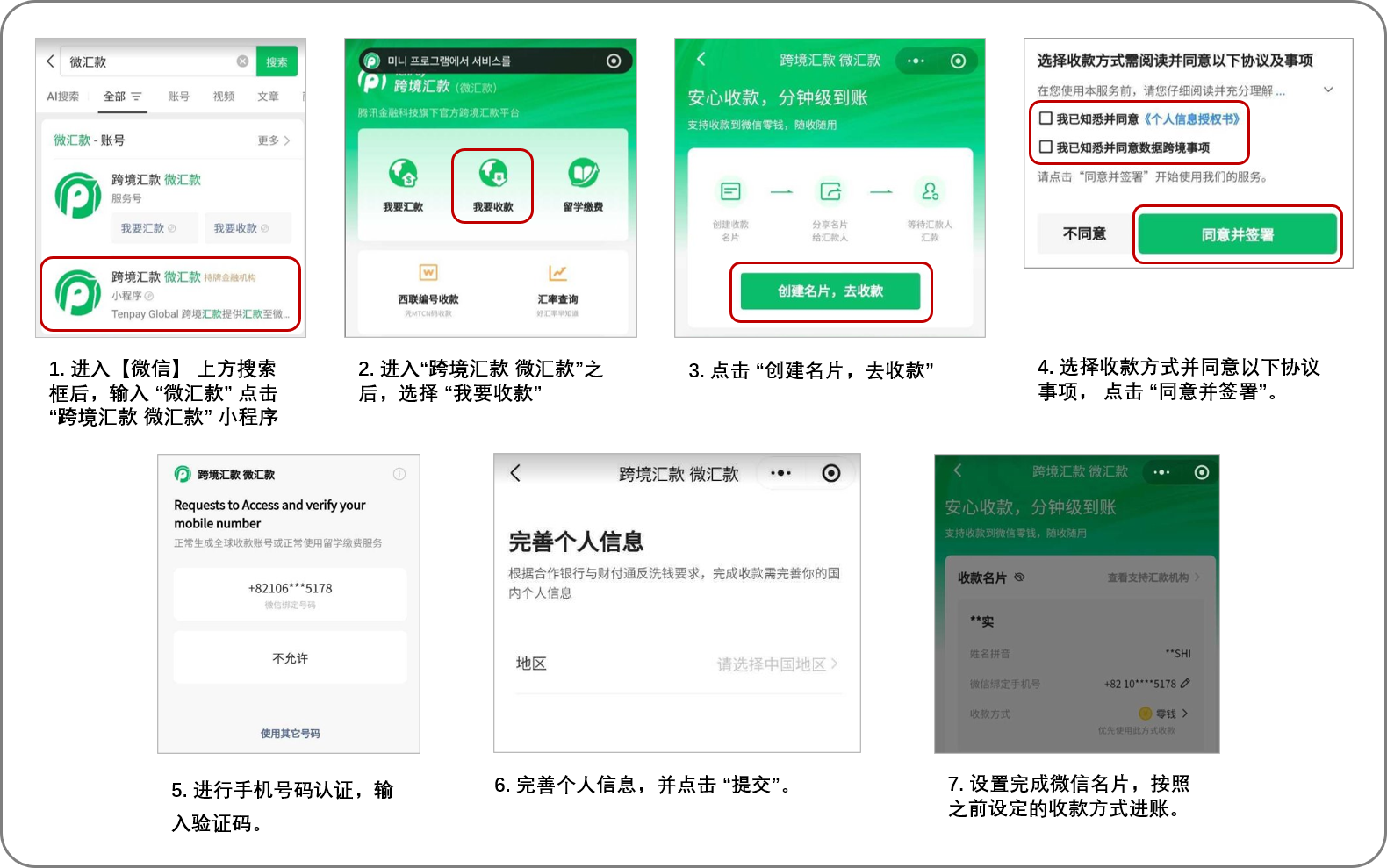
Please refer to the image below for more details.
- Ensure you have downloaded the Weixin (WeChat) app and registered an account.
Type "微汇款" into the search bar at the top of the screen.
Select and enter the "跨境汇款 微汇款" Mini Program from the search results.
Tap "我要收款" (Receive Money), then select "创建名片,去收款" (Create Card to Receive Money).
Enter your 6-digit payment password to complete identity verification.
Agree to the "个人信息授权书" (Personal Information Authorization) and "同意数据跨境事项" (Cross-border Data Transfer Agreement).
Verify your mobile phone number.
Choose your preferred receiving method. (You can pre-set your preference between your Weixin Wallet or a Bank Card.)
Enter the recipient's required information (Address and Occupation).
Once the "微信名片" (WeChat Name Card) setup is complete, the funds will be automatically deposited into your selected account.
※ Important Notice Before Sending Money
Annual Receiving Limit: The maximum limit is 800,000 CNY per year (shared between Weixin Wallet and Bank Card). Please note that if the total received amount exceeds 300,000 CNY within the year, WeChat may conduct a review and request additional documents, such as proof of income. Additionally, different receiving limits may apply to foreigners.
Sender Age Restrictions: Transfers may be canceled if the sender is under 18 or aged 76 and older.
Monthly Frequency Limit: A recipient can receive money up to 15 times per month (combined total for both Wallet and Bank Card).
Per-Transaction Limit: The maximum amount allowed per transfer is 30,000 CNY.
Bank Card Linking: Bank card linking needs to be completed only once per receiving number.
Account Information Match: The transfer may be canceled if the recipient's name does not exactly match the name on their Weixin account, or if the phone number linked to Weixin is entered incorrectly.
48-Hour Time Limit: The transfer may be canceled if the recipient fails to link their receiving method in the Weixin app within 48 hours.
Remittance Purpose (for Wallet): To receive funds directly into the Weixin Wallet, the sender must select either 'Salary' or 'Family Support' as the purpose of the transfer when applying.
Refund Processing Time: Refunds take approximately 2 to 3 business days (excluding weekends and holidays) from the date the refund is requested or the transfer is canceled.
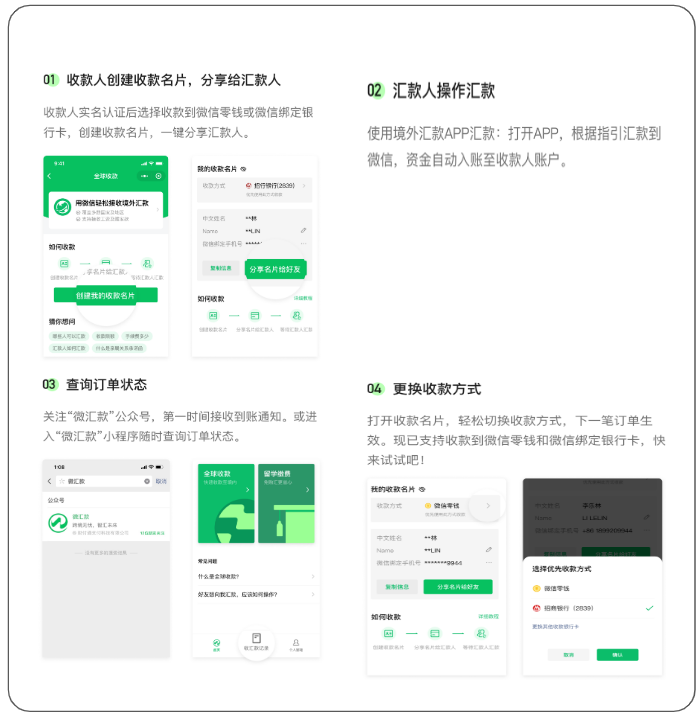
[ How to set the receiving method Step1]
[ How to set the receiving method Step2]
◈ Cross-Border Money Transfer (Tenpay Global)
When receiving a transfer, WeChat (Tenpay Global) recipients are required to complete a one-time verification process, which includes submitting their information and agreeing to the terms and conditions.
- If this process is not completed, the transfer may not be processed successfully.
- This is required only once for the first transfer and will not affect any future transactions.
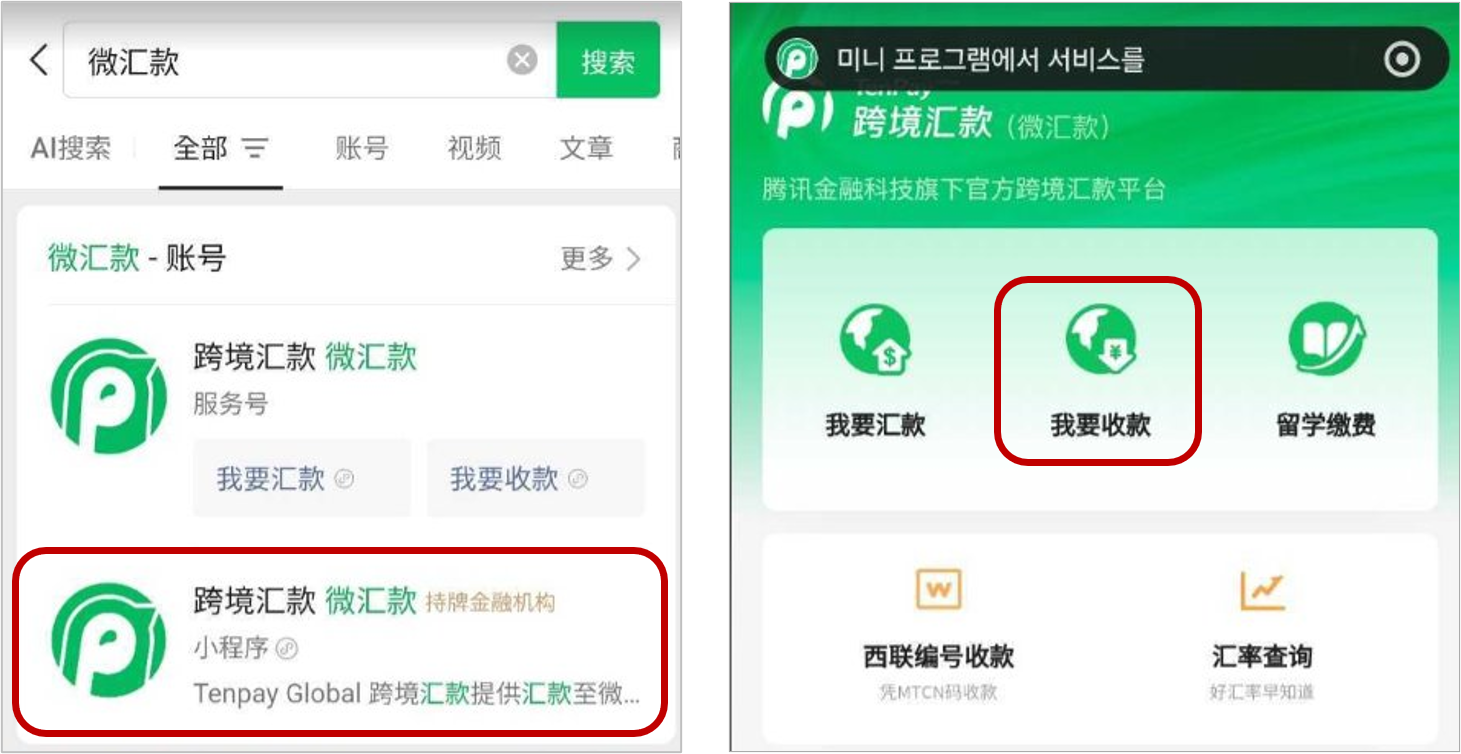
1. Access the Tenpay Global Mini Program
- Search for 【微汇款 (Tenpay)】 in the WeChat search window.
- Access the 【跨境汇款 微汇款 (Cross-Border Remittance - Tenpay Global)】 Mini Program.
- Click 【我要收款 (Receive Money)】.
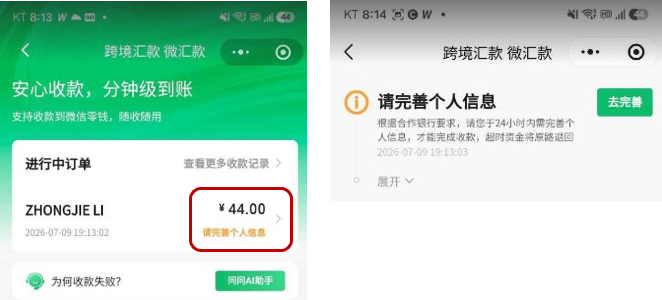
2. Review Pending Transfers & Submit Personal Information
- Select your pending transfer and tap 【请完善个人信息(Complete Personal Information) 】.
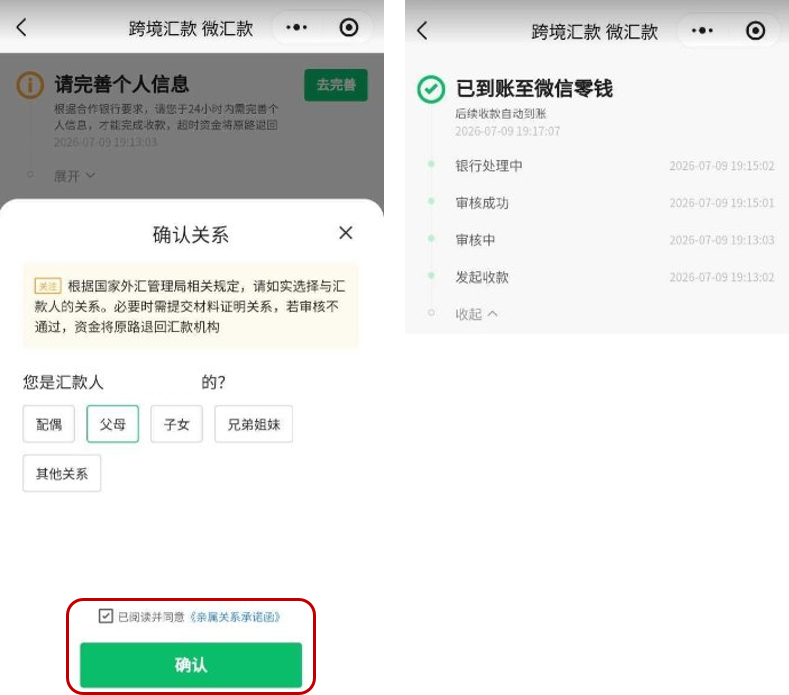
3. Agree to the "亲属关系承诺函" (Family Relationship Commitment Letter) and Receive Money
- Select your relationship with the sender.
- Agree to the 【亲属关系承诺函 (Family Relationship Commitment Letter)】 and tap confirm.
- Check the transfer result.
Was this article helpful?
That’s Great!
Thank you for your feedback
Sorry! We couldn't be helpful
Thank you for your feedback
Feedback sent
We appreciate your effort and will try to fix the article